Custom Creative Tabs 1.21.8
Learn how to create your own creative tab and add items to it.
WARNING
This page is written for version 1.21.8. Documentation for older versions may be incomplete.
Creative Tabs, also known as Item Groups, are the tabs in the creative inventory that store items. You can create your own creative tab to store your items in a separate tab. This is pretty useful if your mod adds a lot of items and you want to keep them organized in one location for your players to easily access.
Creating the Creative Tab
Adding a creative tab is pretty simple. Simply create a new static final field in your items class to store the creative tab and a resource key for it, you can then use the creative tab event similarly to how you added your items to the vanilla creative tabs:
java
public static final ResourceKey<CreativeModeTab> CUSTOM_ITEM_GROUP_KEY = ResourceKey.create(BuiltInRegistries.CREATIVE_MODE_TAB.key(), ResourceLocation.fromNamespaceAndPath(FabricDocsReference.MOD_ID, "item_group"));
public static final CreativeModeTab CUSTOM_ITEM_GROUP = FabricItemGroup.builder()
		.icon(() -> new ItemStack(ModItems.GUIDITE_SWORD))
		.title(Component.translatable("itemGroup.fabric_docs_reference"))
.build();java
// Register the group.
Registry.register(BuiltInRegistries.CREATIVE_MODE_TAB, CUSTOM_ITEM_GROUP_KEY, CUSTOM_ITEM_GROUP);

// Register items to the custom item group.
ItemGroupEvents.modifyEntriesEvent(CUSTOM_ITEM_GROUP_KEY).register(itemGroup -> {
	itemGroup.accept(ModItems.SUSPICIOUS_SUBSTANCE);
	itemGroup.accept(ModItems.POISONOUS_APPLE);
	itemGroup.accept(ModItems.GUIDITE_SWORD);
	itemGroup.accept(ModItems.GUIDITE_HELMET);
	itemGroup.accept(ModItems.GUIDITE_BOOTS);
	itemGroup.accept(ModItems.GUIDITE_LEGGINGS);
	itemGroup.accept(ModItems.GUIDITE_CHESTPLATE);
	itemGroup.accept(ModItems.LIGHTNING_STICK);
	// ...
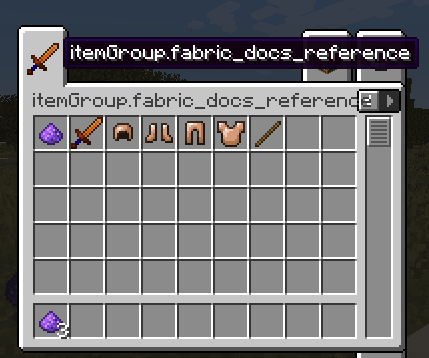
});You should see the creative tab is now in the creative inventory menu. However, it is untranslated - you must add a translation key to your translations file - similarly to how you translated your first item.
Adding a Translation Key
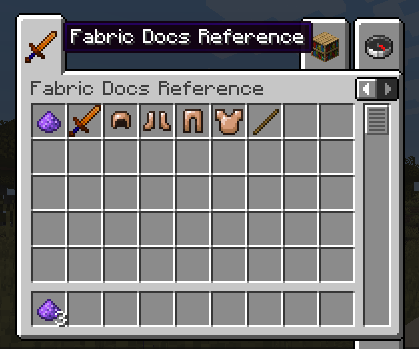
If you used Component.translatable for the displayName method of the creative tab builder, you will need to add the translation to your language file.
json
{
  "itemGroup.fabric_docs_reference": "Fabric Docs Reference"
}Now, as you can see, the creative tab should be correctly named: