

方块容器 26.2
学习如何向方块实体添加容器。
创建用于存储物品的方块(例如箱子和熔炉)时,最好实现容器 Container 接口。 这样就可以使用漏斗等与方块进行交互。
在本教程中,我们将创建一个方块,利用其容器复制放置在其中的任何物品。
创建方块
如果读者已阅读过创建你的第一个方块和方块实体指南,那么这部分内容应该比较熟悉。 我们将会创建一个继承了 'BaseEntityBlock' 和实现了 'EntityBlock' 的“复制方块”。
java
public class DuplicatorBlock extends BaseEntityBlock {
	@Nullable
	@Override
	public BlockEntity newBlockEntity(BlockPos pos, BlockState state) {
		return new DuplicatorBlockEntity(pos, state);
	}

	// ...
}然后,我们需要创建一个 DuplicatorBlockEntity,它需要实现 Container 接口。 大多数的容器都以相同的模式工作。你可以复制和黏贴叫做 'ImplementedContainer' 的辅助类可以帮助你了解更多。我们这里只列举几项重要的实现方法。
显示 ImplementedContainer
java
package com.example.docs.container;

import net.minecraft.core.NonNullList;
import net.minecraft.world.Container;
import net.minecraft.world.ContainerHelper;
import net.minecraft.world.entity.player.Player;
import net.minecraft.world.item.ItemStack;

/**
 * A simple {@link Container} implementation with only default methods + an item list getter.
 *
 * @author Juuz
 */
public interface ImplementedContainer extends Container {
	/**
	 * Retrieves the item list of this container.
	 * Must return the same instance every time it's called.
	 */
	NonNullList<ItemStack> getItems();

	/**
	 * Creates a container from the item list.
	 */
	static ImplementedContainer of(NonNullList<ItemStack> items) {
		return () -> items;
	}

	/**
	 * Creates a new container with the specified size.
	 */
	static ImplementedContainer ofSize(int size) {
		return of(NonNullList.withSize(size, ItemStack.EMPTY));
	}

	/**
	 * Returns the container size.
	 */
	@Override
	default int getContainerSize() {
		return this.getItems().size();
	}

	/**
	 * Checks if the container is empty.
	 * @return true if this container has only empty stacks, false otherwise.
	 */
	@Override
	default boolean isEmpty() {
		for (int i = 0; i < this.getContainerSize(); i++) {
			ItemStack stack = this.getItem(i);

			if (!stack.isEmpty()) {
				return false;
			}
		}

		return true;
	}

	/**
	 * Retrieves the item in the slot.
	 */
	@Override
	default ItemStack getItem(int slot) {
		return this.getItems().get(slot);
	}

	/**
	 * Removes items from a container slot.
	 * @param slot  The slot to remove from.
	 * @param count How many items to remove. If there are fewer items in the slot than what are requested,
	 *              takes all items in that slot.
	 */
	@Override
	default ItemStack removeItem(int slot, int count) {
		ItemStack result = ContainerHelper.removeItem(this.getItems(), slot, count);

		if (!result.isEmpty()) {
			this.setChanged();
		}

		return result;
	}

	/**
	 * Removes all items from a container slot.
	 * @param slot The slot to remove from.
	 */
	@Override
	default ItemStack removeItemNoUpdate(int slot) {
		return ContainerHelper.takeItem(this.getItems(), slot);
	}

	/**
	 * Replaces the current stack in an container slot with the provided stack.
	 * @param slot  The container slot of which to replace the item stack.
	 * @param stack The replacing item stack. If the stack is too big for
	 *              this container ({@link Container#getMaxStackSize()}),
	 *              it gets resized to this container's maximum amount.
	 */
	@Override
	default void setItem(int slot, ItemStack stack) {
		this.getItems().set(slot, stack);

		stack.limitSize(this.getMaxStackSize(stack));

		this.setChanged();
	}

	/**
	 * Clears the container.
	 */
	@Override
	default void clearContent() {
		this.getItems().clear();
	}

	/**
	 * Marks that the state has changed.
	 * Must be called after changes in the container, so that the game can properly save
	 * the container contents and notify neighboring blocks of container changes.
	 */
	@Override
	default void setChanged() {
		// Override if you want behavior.
	}

	/**
	 * @return true if the player can use the container, false otherwise.
	 */
	@Override
	default boolean stillValid(Player player) {
		return true;
	}
}java
public class DuplicatorBlockEntity extends BlockEntity implements ImplementedContainer {
	private final NonNullList<ItemStack> items = NonNullList.withSize(1, ItemStack.EMPTY);

	public DuplicatorBlockEntity(BlockPos pos, BlockState state) {
		super(ModBlockEntities.DUPLICATOR_BLOCK_ENTITY, pos, state);
	}

	@Override
	public NonNullList<ItemStack> getItems() {
		return this.items;
	}
}items 列表用于存储容器的内容。 对于这个方块,我们将其输入槽的大小设置为 1。
别忘了在各自的类中注册方块和方块实体!
保存和加载
如果我们希望游戏内容像原版 BlockEntity 一样在游戏重新加载后仍然存在,我们需要将其保存为 NBT。 幸运的是,Mojang 提供了一个名为 ContainerHelper 的辅助类,其中包含了所有必要的逻辑。
java
@Override
protected void loadAdditional(ValueInput input) {
	super.loadAdditional(input);
	ContainerHelper.loadAllItems(input, this.items);
}

@Override
protected void saveAdditional(ValueOutput output) {
	ContainerHelper.saveAllItems(output, this.items);
	super.saveAdditional(output);
}与容器交互
从技术上讲,容器已经可以正常工作了。 但是,目前我们需要使用漏斗来放入物品。 让我们把它改成可以通过右键点击方块来放入物品。
为此,我们需要重写 DuplicatorBlock 中的 useItemOn 方法:
java
@Override
protected InteractionResult useItemOn(ItemStack stack, BlockState state, Level world, BlockPos pos, Player player, InteractionHand hand, BlockHitResult hit) {
	if (!(world.getBlockEntity(pos) instanceof DuplicatorBlockEntity duplicatorBlockEntity)) {
		return InteractionResult.PASS;
	}

	if (!player.getItemInHand(hand).isEmpty() && duplicatorBlockEntity.isEmpty()) {
		duplicatorBlockEntity.setItem(0, player.getItemInHand(hand).copy());
		player.getItemInHand(hand).setCount(0);
	}

	return InteractionResult.SUCCESS;
}这里,如果玩家持有物品并且有空槽位,我们将物品从玩家手中移动到方块的容器中,并返回 InteractionResult.SUCCESS。
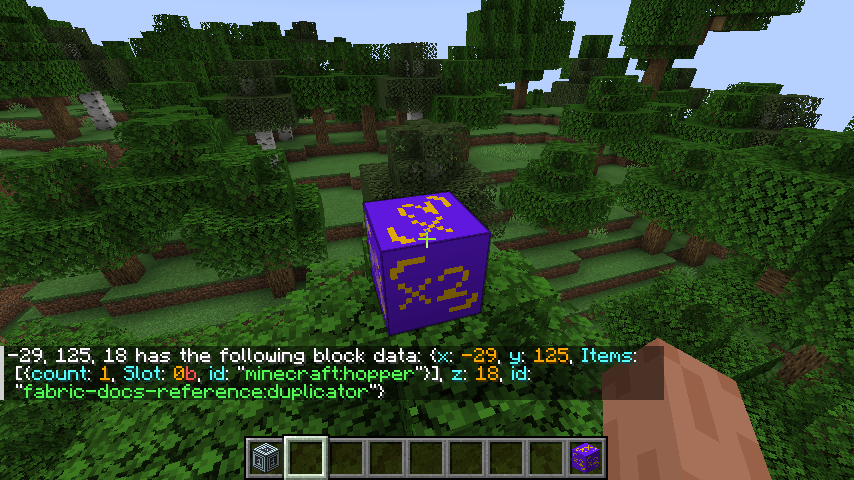
现在,当你右键点击带有物品的方块时,你将不再拥有该物品! 如果你对该方块运行 /data get block 命令,你会在 NBT 的 Items 字段中看到物品。
复制物品
现在我们来修改一下,让这个方块复制你扔进去的物品堆,但每次只复制两个。 而且每次复制后都要等一秒钟,以免物品刷爆!
为此,我们将向 DuplicatorBlockEntity 添加一个 tick 函数,以及一个用于存储等待时间的字段:
java
private int timeSinceDropped = 0;

public static void tick(Level world, BlockPos blockPos, BlockState blockState, DuplicatorBlockEntity duplicatorBlockEntity) {
	if (duplicatorBlockEntity.isEmpty()) return;
	duplicatorBlockEntity.timeSinceDropped++;

	if (duplicatorBlockEntity.timeSinceDropped < 10) return;
	duplicatorBlockEntity.timeSinceDropped = 0;

	ItemStack duplicate = duplicatorBlockEntity.getItem(0).split(1);

	Block.popResourceFromFace(world, blockPos, Direction.UP, duplicate);
	Block.popResourceFromFace(world, blockPos, Direction.UP, duplicate);
}DuplicatorBlock 现在应该有一个 getTicker 方法,该方法返回对 DuplicatorBlockEntity::tick 的引用。
世界容器
默认情况下,你可以从容器的任意一侧放入和取出物品。 但是,有时这可能并非所需行为:例如,熔炉只能从侧面接收燃料,从顶部接收物品。
为了实现这种行为,我们需要在 BlockEntity 中实现 WorldlyContainer 接口。 该接口包含三个方法:
getSlotsForFace(Direction)允许你控制可以从给定侧与哪些槽位进行交互。canPlaceItemThroughFace(int, ItemStack, Direction)允许你控制是否可以从给定的一侧将物品输入到槽位中。canTakeItemThroughFace(int, ItemStack, Direction)允许你控制是否可以从给定侧的槽位中取出物品。
让我们修改 DuplicatorBlockEntity,使其只接受来自顶部的物品:
java
@Override
public int[] getSlotsForFace(Direction side) {
	return new int[]{ 0 };
}

@Override
public boolean canPlaceItemThroughFace(int slot, ItemStack stack, @Nullable Direction dir) {
	return dir == Direction.UP;
}

@Override
public boolean canTakeItemThroughFace(int slot, ItemStack stack, Direction dir) {
	return true;
}getSlotsForFace 返回一个数组,其中包含可以从给定侧进行交互的槽位 索引。 在本例中,我们只有一个槽位 (0),因此我们返回一个仅包含该索引的数组。
此外,我们应该修改 DuplicatorBlock 的 useItemOn 方法,使其真正遵循新的行为:
java
if (!duplicatorBlockEntity.canPlaceItemThroughFace(0, stack, hit.getDirection())) {
	return InteractionResult.PASS;
}现在,如果我们尝试从侧面而不是顶部输入物品,那就行不通了!
菜单
要像使用箱子一样通过菜单访问新的容器方块,请参阅容器菜单指南。