

Block Containers 26.2
Learn how to add containers to your block entities.
It's good practice when creating blocks that can store items, like chests and furnaces, to implement Container. This makes it possible to, for example, interact with the block using hoppers.
In this tutorial we'll create a block that uses its container to duplicate any items placed in it.
Creating the Block
This should be familiar to the reader if they've followed the Creating Your First Block and Block Entities guides. We'll create a DuplicatorBlock that extends BaseEntityBlock and implements EntityBlock.
java
public class DuplicatorBlock extends BaseEntityBlock {
	@Nullable
	@Override
	public BlockEntity newBlockEntity(BlockPos pos, BlockState state) {
		return new DuplicatorBlockEntity(pos, state);
	}

	// ...
}Then, we need to create a DuplicatorBlockEntity, which needs to implement the Container interface. As most containers are generally expected to work the same way, you can copy and paste a helper called ImplementedContainer that does most of the work, leaving us with just a few methods to implement.
Show ImplementedContainer
java
package com.example.docs.container;

import net.minecraft.core.NonNullList;
import net.minecraft.world.Container;
import net.minecraft.world.ContainerHelper;
import net.minecraft.world.entity.player.Player;
import net.minecraft.world.item.ItemStack;

/**
 * A simple {@link Container} implementation with only default methods + an item list getter.
 *
 * @author Juuz
 */
public interface ImplementedContainer extends Container {
	/**
	 * Retrieves the item list of this container.
	 * Must return the same instance every time it's called.
	 */
	NonNullList<ItemStack> getItems();

	/**
	 * Creates a container from the item list.
	 */
	static ImplementedContainer of(NonNullList<ItemStack> items) {
		return () -> items;
	}

	/**
	 * Creates a new container with the specified size.
	 */
	static ImplementedContainer ofSize(int size) {
		return of(NonNullList.withSize(size, ItemStack.EMPTY));
	}

	/**
	 * Returns the container size.
	 */
	@Override
	default int getContainerSize() {
		return this.getItems().size();
	}

	/**
	 * Checks if the container is empty.
	 * @return true if this container has only empty stacks, false otherwise.
	 */
	@Override
	default boolean isEmpty() {
		for (int i = 0; i < this.getContainerSize(); i++) {
			ItemStack stack = this.getItem(i);

			if (!stack.isEmpty()) {
				return false;
			}
		}

		return true;
	}

	/**
	 * Retrieves the item in the slot.
	 */
	@Override
	default ItemStack getItem(int slot) {
		return this.getItems().get(slot);
	}

	/**
	 * Removes items from a container slot.
	 * @param slot  The slot to remove from.
	 * @param count How many items to remove. If there are fewer items in the slot than what are requested,
	 *              takes all items in that slot.
	 */
	@Override
	default ItemStack removeItem(int slot, int count) {
		ItemStack result = ContainerHelper.removeItem(this.getItems(), slot, count);

		if (!result.isEmpty()) {
			this.setChanged();
		}

		return result;
	}

	/**
	 * Removes all items from a container slot.
	 * @param slot The slot to remove from.
	 */
	@Override
	default ItemStack removeItemNoUpdate(int slot) {
		return ContainerHelper.takeItem(this.getItems(), slot);
	}

	/**
	 * Replaces the current stack in an container slot with the provided stack.
	 * @param slot  The container slot of which to replace the item stack.
	 * @param stack The replacing item stack. If the stack is too big for
	 *              this container ({@link Container#getMaxStackSize()}),
	 *              it gets resized to this container's maximum amount.
	 */
	@Override
	default void setItem(int slot, ItemStack stack) {
		this.getItems().set(slot, stack);

		stack.limitSize(this.getMaxStackSize(stack));

		this.setChanged();
	}

	/**
	 * Clears the container.
	 */
	@Override
	default void clearContent() {
		this.getItems().clear();
	}

	/**
	 * Marks that the state has changed.
	 * Must be called after changes in the container, so that the game can properly save
	 * the container contents and notify neighboring blocks of container changes.
	 */
	@Override
	default void setChanged() {
		// Override if you want behavior.
	}

	/**
	 * @return true if the player can use the container, false otherwise.
	 */
	@Override
	default boolean stillValid(Player player) {
		return true;
	}
}java
public class DuplicatorBlockEntity extends BlockEntity implements ImplementedContainer {
	private final NonNullList<ItemStack> items = NonNullList.withSize(1, ItemStack.EMPTY);

	public DuplicatorBlockEntity(BlockPos pos, BlockState state) {
		super(ModBlockEntities.DUPLICATOR_BLOCK_ENTITY, pos, state);
	}

	@Override
	public NonNullList<ItemStack> getItems() {
		return this.items;
	}
}The items list is where the container's contents are stored. For this block we have it set to a size of 1 slot for the input.
Don't forget to register the block and block entity in their respective classes!
Saving & Loading
If we want the contents to persist between game reloads like a vanilla BlockEntity, we need to save it as NBT. Thankfully, Mojang provides a helper class called ContainerHelper with all the necessary logic.
java
@Override
protected void loadAdditional(ValueInput input) {
	super.loadAdditional(input);
	ContainerHelper.loadAllItems(input, this.items);
}

@Override
protected void saveAdditional(ValueOutput output) {
	ContainerHelper.saveAllItems(output, this.items);
	super.saveAdditional(output);
}Interacting with the Container
Technically, the container is already functional. However, to insert items, we currently need to use hoppers. Let's make it so that we can insert items by right-clicking the block.
To do that, we need to override the useItemOn method in the DuplicatorBlock:
java
@Override
protected InteractionResult useItemOn(ItemStack stack, BlockState state, Level world, BlockPos pos, Player player, InteractionHand hand, BlockHitResult hit) {
	if (!(world.getBlockEntity(pos) instanceof DuplicatorBlockEntity duplicatorBlockEntity)) {
		return InteractionResult.PASS;
	}

	if (!player.getItemInHand(hand).isEmpty() && duplicatorBlockEntity.isEmpty()) {
		duplicatorBlockEntity.setItem(0, player.getItemInHand(hand).copy());
		player.getItemInHand(hand).setCount(0);
	}

	return InteractionResult.SUCCESS;
}Here, if the player is holding an item and there is an empty slot, we move the item from the player's hand to the block's container and return InteractionResult.SUCCESS.
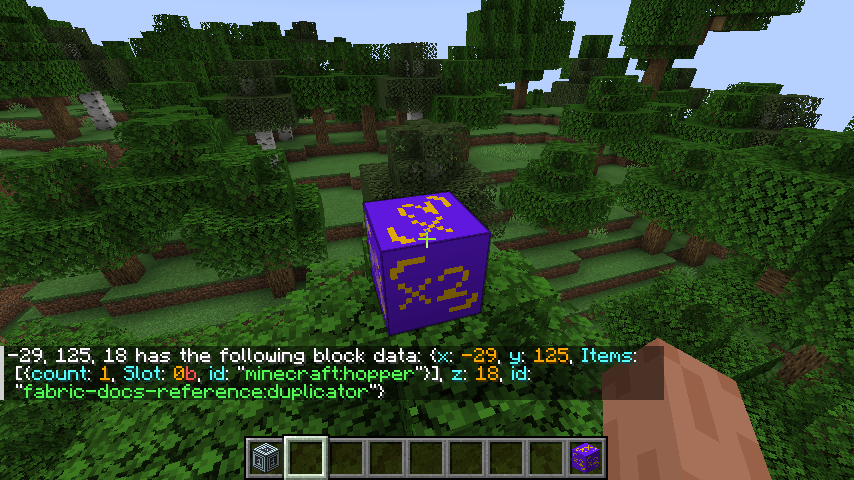
Now, when you right-click the block with an item, you'll no longer have it! If you run /data get block on the block, you'll see the item in the Items field in the NBT.
Duplicating Items
Let's now make it so that the block duplicates the stack you threw in it, but only two items at a time. And let's make it wait a second every time to not spam the player with items!
To do this, we'll add a tick function to the DuplicatorBlockEntity, and a field to store how much we've been waiting:
java
private int timeSinceDropped = 0;

public static void tick(Level world, BlockPos blockPos, BlockState blockState, DuplicatorBlockEntity duplicatorBlockEntity) {
	if (duplicatorBlockEntity.isEmpty()) return;
	duplicatorBlockEntity.timeSinceDropped++;

	if (duplicatorBlockEntity.timeSinceDropped < 10) return;
	duplicatorBlockEntity.timeSinceDropped = 0;

	ItemStack duplicate = duplicatorBlockEntity.getItem(0).split(1);

	Block.popResourceFromFace(world, blockPos, Direction.UP, duplicate);
	Block.popResourceFromFace(world, blockPos, Direction.UP, duplicate);
}The DuplicatorBlock should now have a getTicker method that returns a reference to DuplicatorBlockEntity::tick.
Worldly Containers
By default, you can insert and extract items from the container from any side. However, this might not be the desired behavior sometimes: for example, a furnace only accepts fuel from the side and items from the top.
To create this behavior, we need to implement the WorldlyContainer interface in the BlockEntity. This interface has three methods:
getSlotsForFace(Direction)lets you control which slots can be interacted with from a given side.canPlaceItemThroughFace(int, ItemStack, Direction)lets you control whether an item can be inserted into a slot from a given side.canTakeItemThroughFace(int, ItemStack, Direction)lets you control whether an item can be extracted from a slot from a given side.
Let's modify the DuplicatorBlockEntity to only accept items from the top:
java
@Override
public int[] getSlotsForFace(Direction side) {
	return new int[]{ 0 };
}

@Override
public boolean canPlaceItemThroughFace(int slot, ItemStack stack, @Nullable Direction dir) {
	return dir == Direction.UP;
}

@Override
public boolean canTakeItemThroughFace(int slot, ItemStack stack, Direction dir) {
	return true;
}The getSlotsForFace returns an array of the slot indices that can be interacted with from the given side. In this case, we only have a single slot (0), so we return an array with just that index.
Also, we should modify the useItemOn method of the DuplicatorBlock to actually respect the new behavior:
java
if (!duplicatorBlockEntity.canPlaceItemThroughFace(0, stack, hit.getDirection())) {
	return InteractionResult.PASS;
}Now, if we try to insert items from the side instead of the top, it won't work!
Menus
To access the new container block via a menu, like you do with a chest, refer to the Container Menus guide.