


Access Widening 26.2
Learn how to use access wideners from class tweaker files.
Access widening is a type of class tweaking used to loosen the access limits of classes, methods and fields and reflect that change in the decompiled source. This includes making them public, extendable and/or mutable.
Access widener entries can be transitive to make changes visible to mods depending on yours.
To access fields or methods, it can be safer and simpler to use accessor mixins, but there are two situations where accessors are insufficient and access widening is necessary:
- If you need to access a
private,protectedor package-private class - If you need to override a
finalmethod, or subclass afinalclass
However, unlike accessor mixins, class tweaking only works on Vanilla Minecraft classes, and not on other mods.
Access Directives
Access widener entries start with one of three base directive keywords to specify the type of modification to apply.
After the keyword come the parameters, usually the targets of the widening.
The same class, method, or field, can be targeted by multiple access widening entries, one on each line.
Access directives can also be made transitive by adding the transitive- prefix before the base access directive.
Accessible
accessible can target classes, methods and fields:
- Fields and Classes are made public.
- Methods are made public, and final if originally private.
Making a method or field accessible also makes its class accessible.
Extendable
extendable can target classes and methods only:
- Classes are made public and non-final.
- Methods are made non-final, and protected if originally private.
Making a method extendable also makes its class extendable.
Mutable
mutable can make a field non-final.
Specifying Targets
For class tweaking, classes use their internal names. For fields and methods you must specify their class name, their name, and their bytecode descriptor.
Format:
classtweaker
<accessible / extendable> class <className>Example:
classtweaker
# Makes the inner class MenuSupplier in MenuType public
accessible class net/minecraft/world/inventory/MenuType$MenuSupplierGenerating Entries
Manually writing access widener entries is time-consuming and prone to human error. Let's look at tools that simplify a part of the process by allowing you to generate and copy entries.
mcsrc.dev
mcsrc allows you to decompile and navigate Minecraft source in the browser and copy Mixin, access widener or access transformer targets to clipboard.
To copy an access widener entry, first navigate to the class which you want to modify, and right-click on your target to open the popup menu.
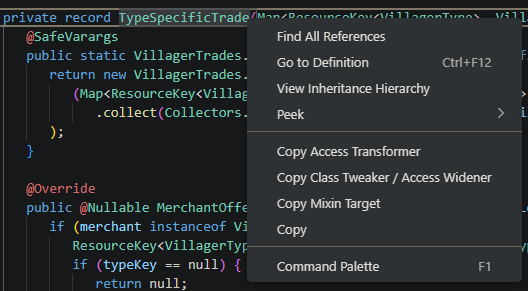
Then, click on Copy Class Tweaker / Access Widener, and a confirmation should appear at the top of the page.

You can then paste the entry in your class tweaker file.
Minecraft Development Plugin (IntelliJ IDEA)
The Minecraft Development Plugin, also known as MCDev, is an IntelliJ IDEA plugin to assist in various aspects of Minecraft mod development. For example, it lets you copy access widener entries from the decompiled source target to the clipboard.
To copy an access widener entry, first navigate to the class which you want to modify, and right-click on your target to open the popup menu.
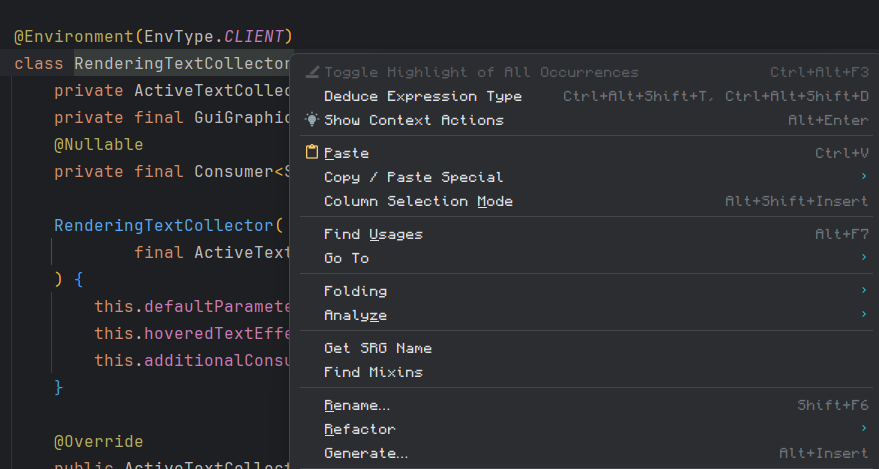
Then, click on Copy / Paste Special and AW Entry.
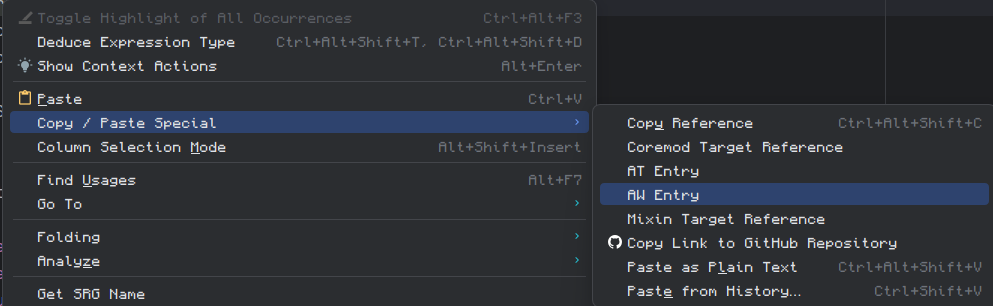
A confirmation should now pop up on the element you right-clicked.

You can then paste the entry in your class tweaker file.
Applying Changes
To see your changes applied, you must refresh your Gradle project and regenerate sources. The elements you targeted should have their access limits modified accordingly. Make sure to reopen any targeted class from the decompiled source in order to see the modifications.
TIP
If modifications do not appear, you can try validating the file and checking if any errors appear.