Container Menus 26.2
A guide explaining how to create a simple menu for a container block.
PREREQUISITES
You should first read Block Containers to familiarize yourself with creating a container block entity.
When opening a container, like a chest, mainly two things are needed to display the contents of it:
- a
Screenwhich handles rendering the contents and background onto the display. - a
Menuthat handles shift-clicking logic and syncing between the server and client.
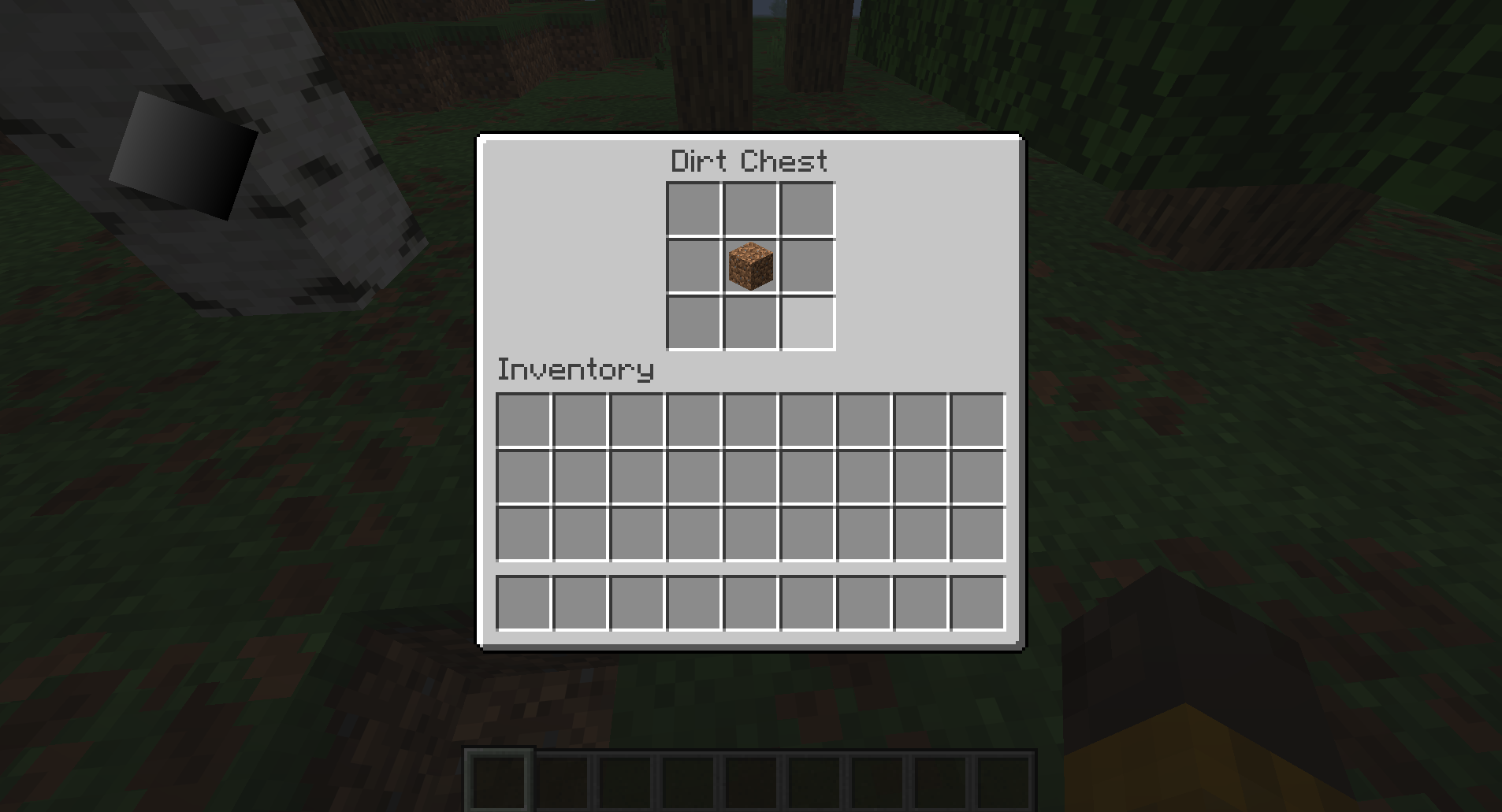
In this guide, we will create a dirt chest with a 3x3 container that can be accessed by right-clicking and opening a screen.
Creating the Block
First, we want to create a block and block entity; read more in the Block Containers guide.
java
public class DirtChestBlock extends BaseEntityBlock {
	@Override
	public @Nullable BlockEntity newBlockEntity(BlockPos pos, BlockState state) {
		return new DirtChestBlockEntity(pos, state);
	}
	// ...
}java
public class DirtChestBlockEntity extends BlockEntity implements ImplementedContainer {
	public static final int CONTAINER_SIZE = 3 * 3;
	private final NonNullList<ItemStack> items = NonNullList.withSize(CONTAINER_SIZE, ItemStack.EMPTY);

	// ...
}In addition to the normal block entity methods, we need to override the stillValid method. This method will be called every tick to check if the player should be forced out of the menu. We will use the default implementation of this method from ContainerHelper, which checks if our block entity still exists and if the player is within the interaction range.
java
@Override
public boolean stillValid(Player player) {
	return Container.stillValidBlockEntity(this, player);
}After implementing our menu, it will close automatically when the player is pushed away.
Opening the Menu
We want to be able to open the menu somehow, so we will handle that within the useWithoutItem method:
java
@Override
protected InteractionResult useWithoutItem(BlockState state, Level level, BlockPos pos, Player player, BlockHitResult hit) {
	if (!level.isClientSide() && level.getBlockEntity(pos) instanceof DirtChestBlockEntity dirtChest) {
		player.openMenu(dirtChest);
	}

	return InteractionResult.SUCCESS;
}Implementing MenuProvider
To add the menu functionality, we now need to implement MenuProvider in the block entity:
java
public class DirtChestBlockEntity extends BlockEntity implements ImplementedContainer, MenuProvider {
	@Override
	@NonNull
	public Component getDisplayName() {
		return Component.translatable("block.example-mod.dirt_chest");
	}

	@Override
	public @Nullable AbstractContainerMenu createMenu(int containerId, Inventory inventory, Player player) {
		return null;
	}
	// ...
}The getDisplayName method returns the name of the block, which will be displayed at the top of the screen.
Creating the Menu
createMenu wants us to return a menu, but we haven't created one for our block yet. To do this, we'll create a DirtChestMenu class which extends AbstractContainerMenu:
java
public class DirtChestMenu extends AbstractContainerMenu {
	private static final int SLOTS_ROWS = 3;
	private static final int SLOTS_COLUMNS = 3;
	private static final int SLOTS_COUNT = SLOTS_ROWS * SLOTS_COLUMNS;

	private static final int CONTAINER_START = 0;
	private static final int CONTAINER_END = SLOTS_COUNT;
	private static final int INVENTORY_START = CONTAINER_END;
	private static final int INVENTORY_END = INVENTORY_START + Inventory.INVENTORY_SIZE;

	private static final int CONTAINER_START_X = 62;
	private static final int CONTAINER_START_Y = 17;
	private static final int INVENTORY_START_X = 8;
	private static final int INVENTORY_START_Y = 84;

	private final Container container;

	// Client-side constructor
	public DirtChestMenu(final int containerId, final Inventory inventory) {
		this(containerId, inventory, new SimpleContainer(SLOTS_COUNT));
	}

	// Server-side constructor
	public DirtChestMenu(final int containerId, final Inventory inventory, final Container container) {
		super(ModMenuTypes.DIRT_CHEST, containerId);
		checkContainerSize(container, SLOTS_COUNT);
		this.container = container;

		// Some containers do custom logic when opened by a player.
		container.startOpen(inventory.player);

		// Add the slots for our container in a 3x3 grid.
		this.add3x3GridSlots();

		// Add the player inventory slots.
		this.addStandardInventorySlots(inventory, INVENTORY_START_X, INVENTORY_START_Y);
	}

	private void add3x3GridSlots() {
		for (int y = 0; y < SLOTS_ROWS; y++) {
			for (int x = 0; x < SLOTS_COLUMNS; x++) {
				final int slot = x + y * SLOTS_COLUMNS;
				this.addSlot(new Slot(
								this.container,
								slot,
								CONTAINER_START_X + x * SLOT_SIZE,
								CONTAINER_START_Y + y * SLOT_SIZE
				));
			}
		}
	}

	@Override
	public ItemStack quickMoveStack(Player player, int slotIndex) {
		Slot slot = this.slots.get(slotIndex);

		if (!slot.hasItem()) {
			return ItemStack.EMPTY;
		}

		ItemStack stack = slot.getItem();
		ItemStack clicked = stack.copy();

		if (slotIndex < CONTAINER_END) {
			// If the clicked slot is in the container, try moving the item to the player inventory.
			// When moving into the player's inventory, we iterate over slots in a reversed order; starting from the last hotbar slot to the first inventory slot.
			if (!this.moveItemStackTo(stack, INVENTORY_START, INVENTORY_END, /* backwards: */ true)) {
				return ItemStack.EMPTY;
			}
		} else {
			// Else, move the item from the player inventory to the container.
			if (!this.moveItemStackTo(stack, CONTAINER_START, CONTAINER_END, /* backwards: */ false)) {
				return ItemStack.EMPTY;
			}
		}

		if (stack.isEmpty()) {
			slot.setByPlayer(ItemStack.EMPTY);
		} else {
			slot.setChanged();
		}

		return clicked;
	}

	@Override
	public boolean stillValid(Player player) {
		return this.container.stillValid(player);
	}

	@Override
	public void removed(Player player) {
		super.removed(player);
		this.container.stopOpen(player);
	}
}The client-side constructor gets called on the client when the server wants it to open a menu. It creates an empty container which then gets automatically synced with the actual container on the server.
The server-side constructor is called on the server, and because it knows the contents of the container, it can directly pass it as an argument.
quickMoveStack handles shift-clicking items within the menu. This example replicates the behavior of vanilla menus like chests and dispensers.
Then we need to register the menu in a new ModMenuTypes class:
java
public class ModMenuTypes {
	public static final MenuType<DirtChestMenu> DIRT_CHEST = register("dirt_chest", DirtChestMenu::new);

	public static <T extends AbstractContainerMenu> MenuType<T> register(
					String name,
					MenuType.MenuSupplier<T> constructor
	) {
		return Registry.register(BuiltInRegistries.MENU, ExampleMod.id(name), new MenuType<>(constructor, FeatureFlagSet.of()));
	}
}We can now set the return value of createMenu in the block entity to use our menu:
java
@Override
public @Nullable AbstractContainerMenu createMenu(int containerId, Inventory inventory, Player player) {
	return new DirtChestMenu(containerId, inventory, this);
}INFO
The createMenu method only gets called on the server, so we call the server-side constructor and pass in this (the block entity) as the container parameter.
Creating the Screen
To actually display the contents of the container on the client, we also need to create a screen for our menu. We'll make a new class which extends AbstractContainerScreen:
java
public class DirtChestScreen extends AbstractContainerScreen<DirtChestMenu> {
	private static final Identifier CONTAINER_TEXTURE = Identifier.withDefaultNamespace("textures/gui/container/dispenser.png");

	public DirtChestScreen(DirtChestMenu abstractContainerMenu, Inventory inventory, Component component) {
		super(abstractContainerMenu, inventory, component);
		// Center the title
		this.titleLabelX = (this.imageWidth - this.font.width(this.title)) / 2;
	}

	@Override
	public void extractBackground(GuiGraphicsExtractor graphics, int mouseX, int mouseY, float delta) {
		super.extractBackground(graphics, mouseX, mouseY, delta);
		graphics.blit(RenderPipelines.GUI_TEXTURED, CONTAINER_TEXTURE, this.leftPos, this.topPos, 0.0F, 0.0F, this.imageWidth, this.imageHeight, BACKGROUND_TEXTURE_WIDTH, BACKGROUND_TEXTURE_HEIGHT);
	}
}For this screen's background, we're just using the default Dispenser screen texture, because our dirt chest uses the same slot layout. You could alternatively provide your own texture for CONTAINER_TEXTURE.
Because this is a screen for a menu, we also need to register it on the client with the MenuScreens#register() method:
java
public class ExampleModScreens implements ClientModInitializer {
	@Override
	public void onInitializeClient() {
		MenuScreens.register(ModMenuTypes.DIRT_CHEST, DirtChestScreen::new);
	}
}Upon loading your game, you should now have a dirt chest which you can right-click to open a menu and store items in.