Game Rules 26.2
A guide for adding custom game rules.
PREREQUISITES
You might want to have completed the translation generation first, but it is not required.
Game rules act as world-specific configuration options that the player can change in-game with a command. These variables usually control some function of the world, for example pvp, spawn_monsters, and advance_time control whether PvP is enabled, monster spawning, and time passing.
Creating a Game Rule
To create a custom game rule, first create a GameRules class; this is where we are going to declare our game rules. Inside this class, declare two constants: a game rule identifier and the rule itself.
java
public class ExampleModGameRules implements ModInitializer {
	// Create and register a boolean gamerule, disabled by default
	public static final GameRule<Boolean> BAD_VISION_BOOLEAN_GAMERULE = GameRuleBuilder
					.forBoolean(false) // Default value declaration
					.category(GameRuleCategory.MISC)
					.buildAndRegister(ExampleMod.id("bad_vision"));
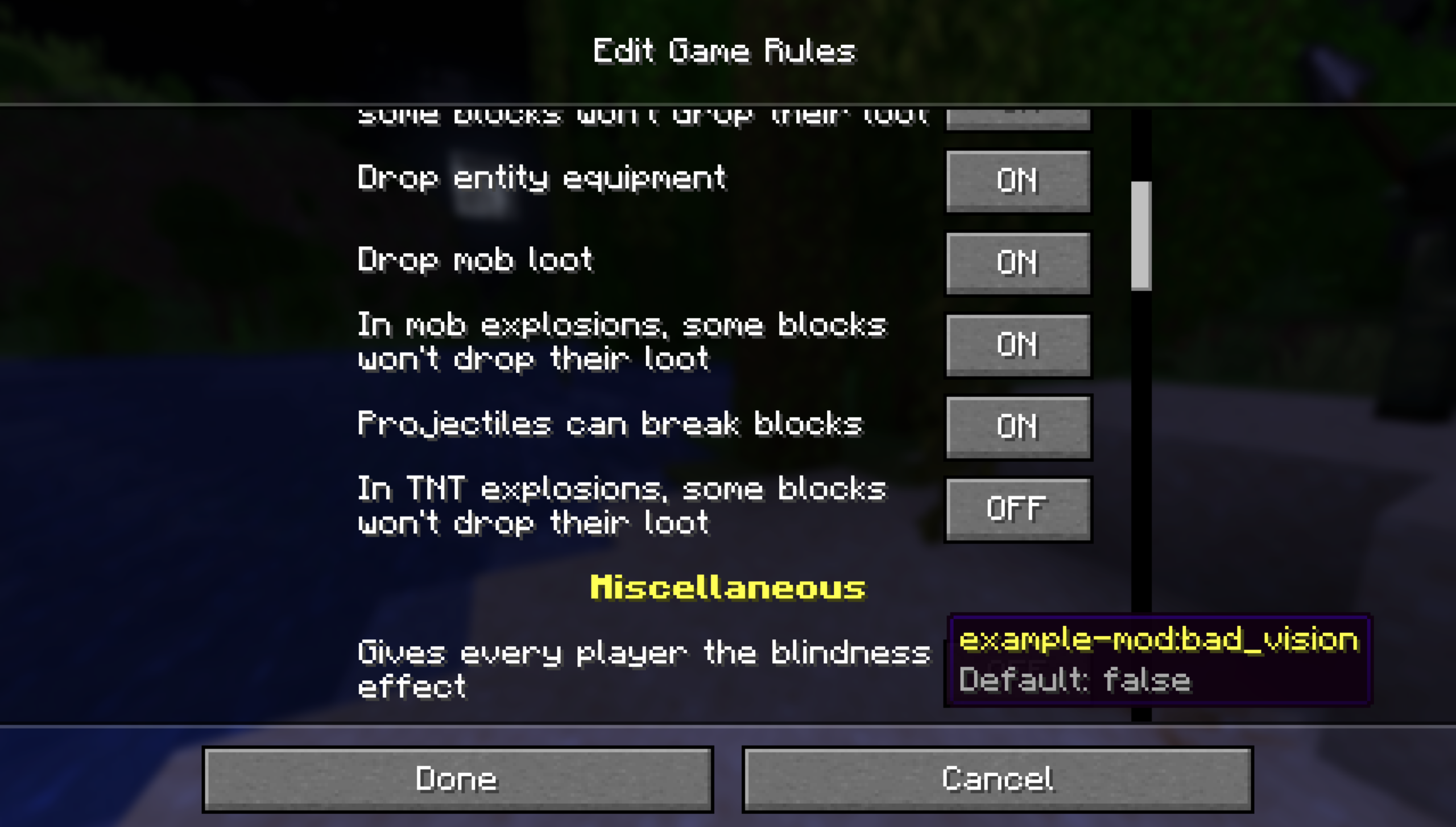
}The category argument (.category(GameRuleCategory.MISC)) determines which category the gamerule falls under in the world creation screen. This example uses the Miscellaneous category provided by vanilla, but additional categories can be added via GameRuleCategory.register. In this example, we have created a boolean game rule with a default value of false and an id of bad_vision. The stored values in game rules are not limited to booleans; other valid types include Doubles, Integers, and Enums.
Example of a game rule storing a double:
java
public static final GameRule<Double> DOUBLE_GAMERULE = GameRuleBuilder
				.forDouble(6.7) // Default value declaration
				.category(GameRuleCategory.MISC)
.buildAndRegister(ExampleMod.id("double_example"));Accessing a Game Rule
Now that we have a game rule and its Identifier, you can access it anywhere with the serverLevel.getGameRules().get(GAMERULE) method, where the argument to the .get() is your game rule constant and not the game rule id.
java
// Check for the state of the gamerule
boolean badVisionEnabled = serverLevel.getGameRules().get(ExampleModGameRules.BAD_VISION_BOOLEAN_GAMERULE);You can also use this to access the values of vanilla game rules:
java
boolean doMobGriefing = serverLevel.getGameRules().get(GameRules.MOB_GRIEFING);For example, for a rule that applies blindness to every player when true, the implementation would be:
java
// In your mod's onInitialize():
ServerTickEvents.END_LEVEL_TICK.register(serverLevel -> {
	// Runs every tick on the server
	// Check for the state of the gamerule
	boolean badVisionEnabled = serverLevel.getGameRules().get(ExampleModGameRules.BAD_VISION_BOOLEAN_GAMERULE);

	if (badVisionEnabled) {
		// If the gamerule is true
		for (Player player : serverLevel.getPlayers(p -> true)) {
			// Apply blindness to every player
			player.addEffect(new MobEffectInstance(
							MobEffects.BLINDNESS,
							40,
							1,
							false,
							false,
							false
			));
		}
	}
});Translations
Now, we need to give our game rule a display name so it can be easily understood from the Game Rules screen. To do this via data generation, add the following lines to your language provider:
java
translationBuilder.add(ExampleMod.id("bad_vision"), "Bad Vision");Lastly we need to give our gamerule a description. To do this via data generation, add the following lines to your language provider:
java
translationBuilder.add(
				Util.makeDescriptionId("gamerule", ExampleMod.id("bad_vision")),
				"Gives every player the blindness effect" // A short description of the game rule
);INFO
These translation keys are used when displaying text in the game rules screen. If you do not use data generation, you can also write them by hand in your assets/example-mod/lang/en_us.json.
json
"example-mod.bad_vision": "Bad Vision",
"gamerule.example-mod.bad_vision": "Gives every player the blindness effect",Changing Game Rules In-Game
Now, you should be able to change the value of your rule in-game with the /gamerule command as such:
mcfunction
/gamerule example-mod:bad_vision trueThe game rule also now shows up in the Miscellaneous category in the Edit Game Rules screen.