


Custom Projectiles 26.2
Learn how to add custom projectiles.
Projectiles are entities that can be thrown or fired by players or other entities. In this guide, we'll look into implementing a simple projectile like a snowball.
We'll call our projectile a Hot Tater. It will be a potato that sets the block or entity it hits on fire.
PREREQUISITES
Creating a projectile requires you to register an item as well as an entity, therefore we suggest going through the Creating Your First Item and Creating Your First Entity guides.
Creating the Projectile Entity
Let's create a HotTaterEntity by extending ThrowableItemProjectile. This class should be in your main source set.
The ThrowableItemProjectile class handles the physics and the item form of the projectile.
java
@NullMarked
public class HotTaterEntity extends ThrowableItemProjectile {
	public HotTaterEntity(EntityType<? extends ThrowableItemProjectile> type, Level level) {
		super(type, level);
	}

	public HotTaterEntity(Level level, LivingEntity owner, ItemStack itemStack) {
		super(ModEntityTypes.HOT_TATER, owner, level, itemStack);
	}

	public HotTaterEntity(Level level, double x, double y, double z, ItemStack itemStack) {
		super(ModEntityTypes.HOT_TATER, x, y, z, level, itemStack);
	}

	@Override
	protected Item getDefaultItem() {
		return ModItems.HOT_TATER;
	}

	@Override
	protected void onHitBlock(BlockHitResult hitResult) {
		super.onHitBlock(hitResult);
		Level level = level();

		// Only modify the world on the server.
		if (!level.isClientSide()) {
			// If the projectile hits a block, place fire on the face it hit.
			BlockPos pos = hitResult.getBlockPos().relative(hitResult.getDirection());

			if (level.isEmptyBlock(pos)) {
				level.setBlockAndUpdate(pos, BaseFireBlock.getState(level, pos));
			}
		}
	}

	@Override
	protected void onHitEntity(EntityHitResult hitResult) {
		super.onHitEntity(hitResult);

		// Only modify the world on the server.
		if (!level().isClientSide()) {
			hitResult.getEntity().igniteForSeconds(5);
		}
	}

	@Override
	protected void onHit(HitResult hitResult) {
		super.onHit(hitResult);

		// Discard the projectile on any hit, or it sinks into the ground forever.
		if (!level().isClientSide()) {
			this.discard();
		}
	}
}There's quite a lot happening here. Let's look at the important code sections.
Constructors
We define 3 constructors. They're used by entity registration, projectile spawning and projectile conversion respectively.
java
public HotTaterEntity(EntityType<? extends ThrowableItemProjectile> type, Level level) {
	super(type, level);
}

public HotTaterEntity(Level level, LivingEntity owner, ItemStack itemStack) {
	super(ModEntityTypes.HOT_TATER, owner, level, itemStack);
}

public HotTaterEntity(Level level, double x, double y, double z, ItemStack itemStack) {
	super(ModEntityTypes.HOT_TATER, x, y, z, level, itemStack);
}Overriding getDefaultItem()
Defines the item form of this projectile.
java
@Override
protected Item getDefaultItem() {
	return ModItems.HOT_TATER;
}IMPORTANT
Your IDE might tell you that it cannot resolve the item: we will create it soon, in the Registration section.
Overriding onHitBlock()
Defines the behavior when this projectile hits a block. We check where the projectile has hit and then set the hit face of that block on fire. This logic is handled on the server side.
java
@Override
protected void onHitBlock(BlockHitResult hitResult) {
	super.onHitBlock(hitResult);
	Level level = level();

	// Only modify the world on the server.
	if (!level.isClientSide()) {
		// If the projectile hits a block, place fire on the face it hit.
		BlockPos pos = hitResult.getBlockPos().relative(hitResult.getDirection());

		if (level.isEmptyBlock(pos)) {
			level.setBlockAndUpdate(pos, BaseFireBlock.getState(level, pos));
		}
	}
}Overriding onHitEntity()
Defines the behavior when this projectile hits an entity. We set the entity that was hit on fire for 5 seconds.
java
@Override
protected void onHitEntity(EntityHitResult hitResult) {
	super.onHitEntity(hitResult);

	// Only modify the world on the server.
	if (!level().isClientSide()) {
		hitResult.getEntity().igniteForSeconds(5);
	}
}Overriding onHit()
Defines the behavior when this projectile hits anything, whether a block or an entity. We will use this to discard the projectile, so that it is removed on hit; without this, the projectile would just keep going.
java
@Override
protected void onHit(HitResult hitResult) {
	super.onHit(hitResult);

	// Discard the projectile on any hit, or it sinks into the ground forever.
	if (!level().isClientSide()) {
		this.discard();
	}
}Creating the Item
We register a simple item. Since we need to implement the throwing logic, our class HotTaterItem will extend Item and implement ProjectileItem. This class should be in your main source set.
java
@NullMarked
public class HotTaterItem extends Item implements ProjectileItem {
	public HotTaterItem(Properties properties) {
		super(properties);
	}

	@Override
	public Projectile asProjectile(Level level, Position position, ItemStack itemStack, Direction direction) {
		return new HotTaterEntity(level, position.x(), position.y(), position.z(), itemStack);
	}

	@Override
	public InteractionResult use(Level level, Player player, InteractionHand hand) {
		ItemStack itemStack = player.getItemInHand(hand);
		level.playSound(null, player.getX(), player.getY(), player.getZ(), SoundEvents.SNOWBALL_THROW, SoundSource.NEUTRAL, 0.5F, 0.4F / (level.getRandom().nextFloat() * 0.4F + 0.8F));

		// Spawn the projectile on the server only.
		if (level instanceof ServerLevel serverLevel) {
			Projectile.spawnProjectileFromRotation(HotTaterEntity::new,
					serverLevel,
					itemStack,
					player,
					/* yOffset: */ 0.0F,
					/* pow: */ 1.5F,
					/* uncertainty: */ 1.0F);
		}

		player.awardStat(Stats.ITEM_USED.get(this));
		itemStack.consume(1, player);
		return InteractionResult.SUCCESS;
	}
}It's a standard item implementation, with some special methods from ProjectileItem. Let's look at them:
Overriding asProjectile()
This method converts the item into its entity form.
java
@Override
public Projectile asProjectile(Level level, Position position, ItemStack itemStack, Direction direction) {
	return new HotTaterEntity(level, position.x(), position.y(), position.z(), itemStack);
}Overriding use()
Defines the action that happens when the item is used. In our case, we call the Projectile.spawnProjectileFromRotation() utility method to spawn the projectile.
In addition to the standard parameters (level, item stack, and player), this utility method takes three additional floats:
yOffset: Offset for the pitch (rotation around the X axis, upward or downward), in degrees. Negative values angle the initial velocity upward.pow: Multiplier for the speed of the projectile movement.uncertainty: Imprecision of the projectile. 0 means no random spread. As the value increases, projectiles will be more dispersed, even when thrown with the same initial position and rotation.
For more information, see the Minecraft Wiki's article on projectiles.
Why is the parameter called yOffset?
We don't know either, dear reader. Despite the name, the offset is applied to the pitch, which is the rotation of the velocity around the X axis:
java
float yd = -Mth.sin((xRot + yOffset) * (float) (Math.PI / 180.0));For example, when vanilla uses a yOffset of -20.0F for splash potions, it changes the initial velocity pitch from source.getXRot() to source.getXRot() - 20.0F (20 degrees upward, toward the sky).
Perhaps a more apt name would have been xRotOffset.
Finally, we award the ITEM_USED stat, consume one item from the stack, and mark the interaction as successful.
java
@Override
public InteractionResult use(Level level, Player player, InteractionHand hand) {
	ItemStack itemStack = player.getItemInHand(hand);
	level.playSound(null, player.getX(), player.getY(), player.getZ(), SoundEvents.SNOWBALL_THROW, SoundSource.NEUTRAL, 0.5F, 0.4F / (level.getRandom().nextFloat() * 0.4F + 0.8F));

	// Spawn the projectile on the server only.
	if (level instanceof ServerLevel serverLevel) {
		Projectile.spawnProjectileFromRotation(HotTaterEntity::new,
				serverLevel,
				itemStack,
				player,
				/* yOffset: */ 0.0F,
				/* pow: */ 1.5F,
				/* uncertainty: */ 1.0F);
	}

	player.awardStat(Stats.ITEM_USED.get(this));
	itemStack.consume(1, player);
	return InteractionResult.SUCCESS;
}Registration
Register the item, like we did in the Creating Your First Item guide. First, define the item's key in ModItemIds:
java
public static final ResourceKey<Item> HOT_TATER = create("hot_tater");Then register the item in ModItems, alongside the others:
java
public static final Item HOT_TATER = register(
		ModItemIds.HOT_TATER,
		HotTaterItem::new,
		new Item.Properties().stacksTo(16)
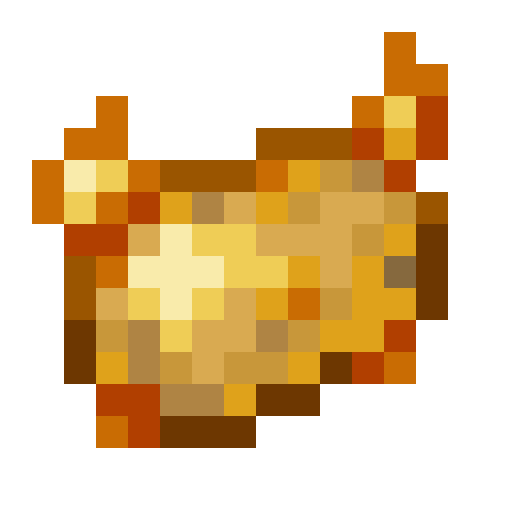
);Don't forget to add a model, texture, client item, and name, using the identifier hot_tater. You should also add the item to a creative tab. Here's an example texture:

Make sure to add the ID of the new entity to ModEntityTypeIds:
java
public static ResourceKey<EntityType<?>> HOT_TATER = create("hot_tater");Now register the entity, like we did in the Creating Your First Entity guide, by adding it as a static field in ModEntityTypes. Since entities and items live in separate registries, the entity type simply uses the same path as the item, like vanilla's snowball:
java
public static final EntityType<HotTaterEntity> HOT_TATER = register(
		ModEntityTypeIds.HOT_TATER,
		EntityType.Builder.<HotTaterEntity>of(HotTaterEntity::new, MobCategory.MISC)
				.sized(0.25f, 0.25f) // Hitbox width and height.
				.clientTrackingRange(4) // How far (in chunks) clients see the entity.
				.updateInterval(10) // Ticks between position updates sent to clients.
);Finally, let's use the vanilla ThrownItemRenderer in the client initializer:
java
EntityRenderers.register(ModEntityTypes.HOT_TATER, ThrownItemRenderer::new);And you're done!